Introduction
This page is a log of the development process of DIggyDiggy a game I developed for the playdate console seeking to challenge myself and experiment with the unique design options presented by the console.
What is DiggyDiggy?
In DiggyDiggy you play as a Dwarf digging for treasure with the end goal of retrieving the lost treasured gem at the bottom of the mine. The gameplay consists of digging down and collecting small gems that can be spent for pick upgrades that allow the player to dig deeper.
Eventually, after retrieving the gem the player must make a mad dash back through their tunnels towards the surface as rising lava chases them.
What is the Playdate?
The Playdate is a unique retro-themed console from Panic Inc. that seeks to simulate a development environment similar to old consoles such as the Atari 2600. The Playdates headline future is its analogue crank used as a game input. It is this crank and all the potential unique gameplay applications that come with it which drew me to work on this console.
One Page GDD
After I had conceived the initial idea I started by producing a one-page game design document. By doing this I was able to think about and visualise each game system individually which allowed me to go into greater depth on the systems and plan how they interacted with each other to achieve the desired player experience.
.jpg)
Movement
This section shows the game's movement system its main feature is the use of the crank to move the player up and down the rope. I chose to use the crank for this because I wanted it to be an integral part of the gameplay. The game uses traditional left and right d-pad movement for moving horizontally.
This section also details the rope, which is implemented as an in-world justification for why the player has to use the crank to move up and down. I chose to make the rope appear over tiles to communicate its purpose to the player as well as cutting the need to devise a separate system to handle this which is better for scope.
Mining
This section shows how the game mining system works by utilising the movement system to inform which tiles to mine rather than implementing an entirely new mining system. This has the added benefit of keeping the game simple making it easier to onboard the player at the start of gameplay.
Several different levels of dirt hardness were planned to give the player a reason to collect gems and travel back to the surface bia pick upgrades.
Upgrade
Implemented to give the player a reason to return to the surface and collect gems.
Treasure and Lava
The treasure acts as the goal of the game with the lava acting as a final boss of sorts to test the player's ability to navigate the tunnels they'd been digging and travelling through, throughout the gameplay.
UI
Used to display key information to the player
Loop
A visualisation of the game's overall gameplay loop. Usually, I'd create loop diagrams for individual systems or gameplay situations but the game is simple enough that I could fit the entire loop onto the GDD
Initial Prototype
The first thing I did was to prototype the game's core features to test its technical viability and the gameplay in general. During this, I discovered that Pulp, (an engine made for Playdate development) had limitations I was unaware of.
The Pulp engine splits its game world into a grid of tiles with no overlap. This meant that I couldn't have the rope overlay the dirt tiles as I had originally planned. My solution to this was to take the 10th frame of the dirt tiles animation and draw the rope over it as part of the sprite. I then made it so that all tiles directly above the player would be set to frame 10. I used this method because I knew the dirt wouldn't need to animate beyond frame 3 but I did leave myself an extra 7 frames of redundancy just in case I needed the extra frames later.


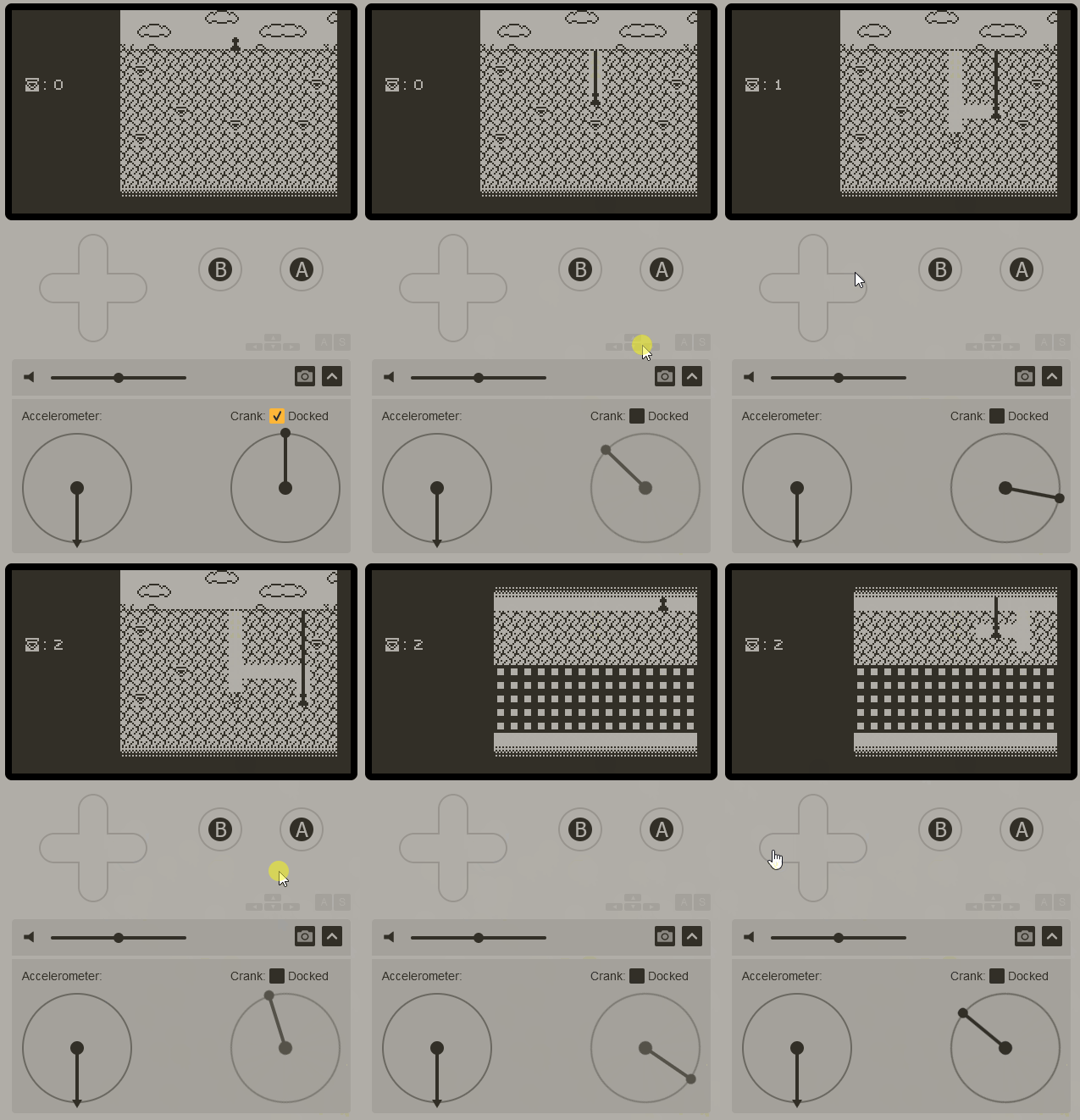
With that solved I moved on to finishing the initial prototype implementing all the key features such as movement, digging, and gem collection.
First Playtest
With the first prototype complete I performed the first playtesting session
with players using Think out loud, Observation, and Discussion types of playtest. Below are some key points I took away from this first test.
-
No root planning. Movement doesn't cost anything.
-
Players found it hard to notice gems.
-
Players often don't realise they can keep going below the bottom of the screen notice level exit.
-
Multiple players ask if the game had any enemies.
1. No root planning.
A problem found during the playtest was that there was no cost to movement. The player was digging out as many tiles as they wanted along with this many players seemed to start digging out as many tiles as possible without thought going against the desired player experience as well as making the final escape from the lava at the end of the game much less interesting.
To combat this I've made it so the player can only dig if they have a solid tile below them. This should force the players to think more about the way they dig as now some gems can become unattainable if they don't plan ahead.
2. Player didn't see gems
During the test, many players failed to see the gems until they were pointed out to them. I believe this is due to the white space within the gems making them blend in with the dirt around them. I've decided to swap the gem asset to be smaller and entirely black and smaller. My hope is by making them smaller the gems always have a gap of white space around them and by by having them completely black, they should stand out within the white space.
OLD NEW

3. Players don't realise they can keep going below the screen
Many players had problems noticing they could keep playing below the bottom of the screen severely limiting their play space. I had initially tried implementing a dithered gradient to help communicate to the player that they could continue down into the darkness but clearly, this wasn't working.
To solve this issue I removed the dithering effect and replaced it with a large rock that is cut off by the bottom of the screen to help the player infer that they can keep going down.


4. Multiple players asking for enemies
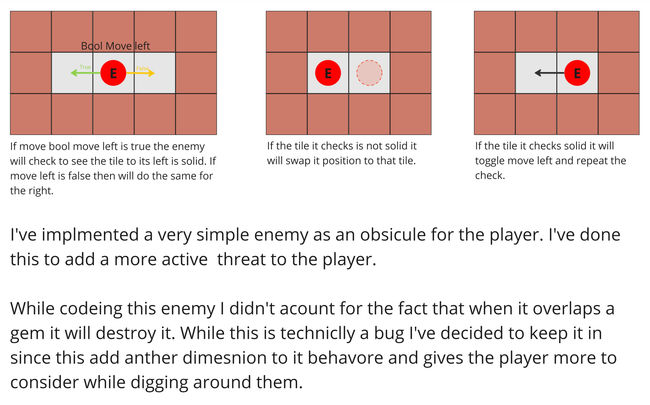
While testing the majority of my players asked if the game had enemies. After being asked this so many times I decided to implement some, creating a new onepage design document to go along with them.
First Hardware Test
While performing simple playtests on physical playdate hardware I've found that moving up and down the rope feels unresponsive.
Even after I stop turning the crank the player continues to move a few tiles along the rope until finally coming to a stop. This problem is exasperated when turning the crank at speed. This is a problem I did not have in the simulator.
This seems to be happening due to the physical crank being analogue giving it a short stopping time versus the digital simulated crank that stops instantly.
This is not in line with my intended player experience since it takes away precision when moving up and down the rope.
Since I cannot change the crank's stopping distance I should swap to measuring the degrees the crank has moved rather than its rotation speed to control the player's movement along the rope.
Second Hardware Test
I've now implemented the lava and treasure at the bottom of the world making the game playable from start to finish. Now it is time for balance and polish.
Though testing on actual playdate hardware I've found that the game has massive performance issues. I didn't account for this because I'm used to working on modern systems where hardware limitations are rarely an issue. I will need to fix this by implementing several performance improvements.
Lava logic is now handled by a single tile rather than 15 running simultaneously.
The rope system now only runs when the player moves instead of every draw frame decreasing the load on the system greatly.
I've removed as many draw events as possible from the game, instead running them only when they are needed.
I've implemented a change where pick power of the same level as the targeted dirt will break in three hits.
These changes have improved performance, I will need to keep this more intelligent design in mind moving forward.
Tile System Discovery
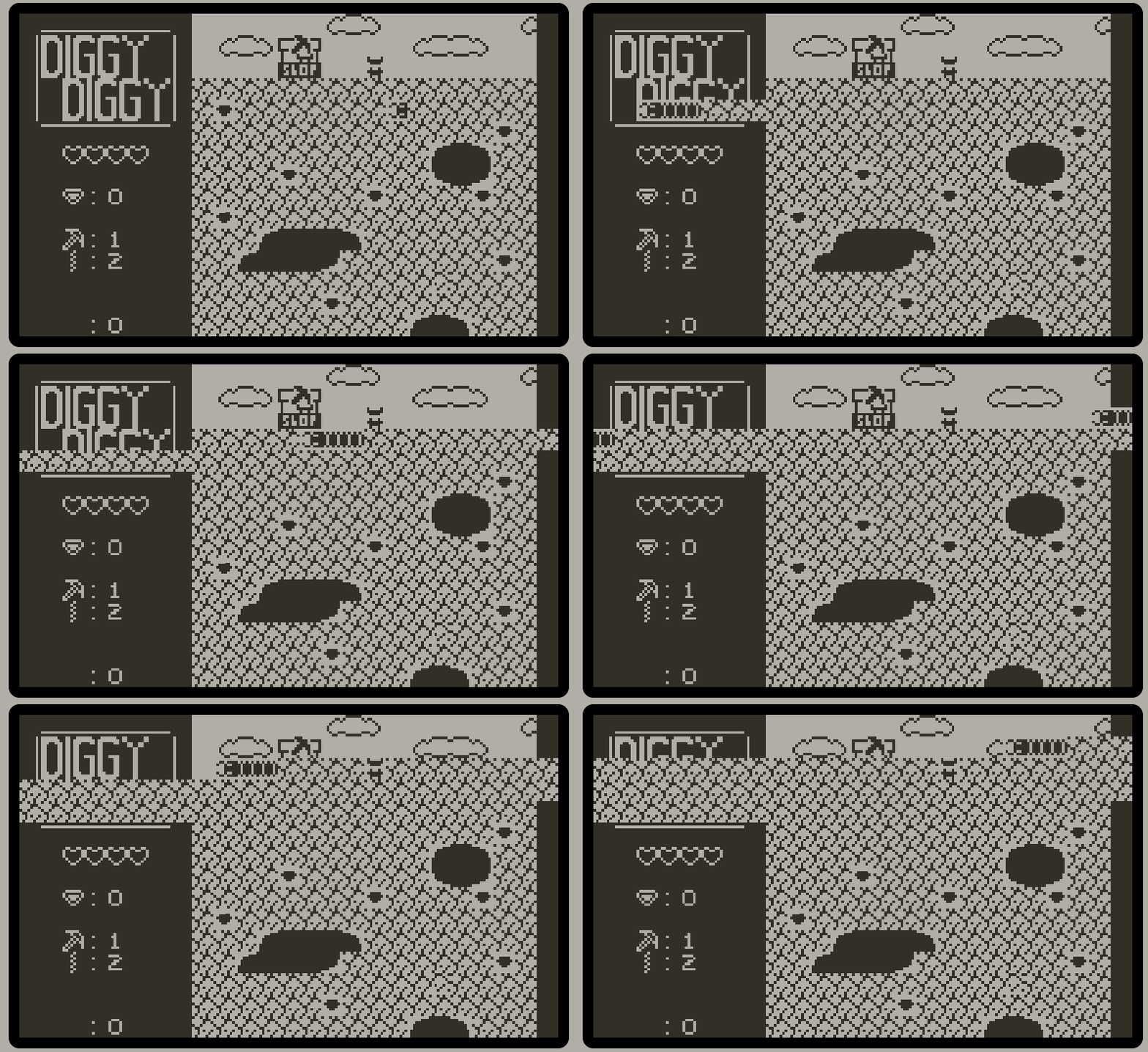
While experimenting with an enemy idea I discovered something interesting about how Pulp handles its tile mapping.
Pulp seems to handle its tiles as a linear list. This means that if I have a sprite that moves to the left every frame when it reaches the leftmost tile it will move to the next value in the list like normal. This makes it appear as if the sprite has moved up a row while mathematically the sprite's tile has simply incremented by one.